
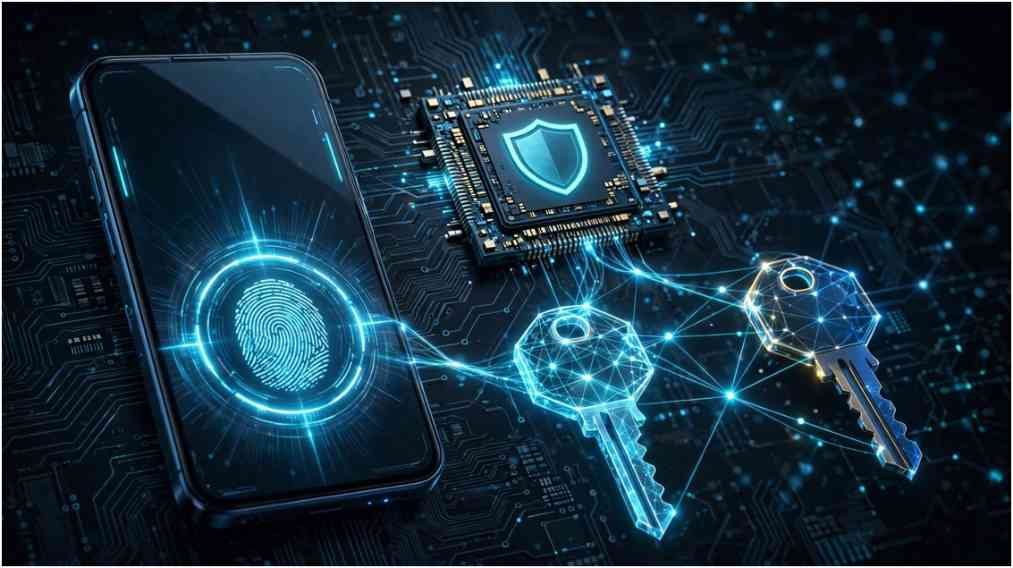
I spent years juggling master passwords, rotated credentials, and hardware tokens across dozens of mission-critical accounts. When major platforms rolled out WebAuthn support, I transitioned my identity architecture to verify whether are passkeys safer than passwords in practice. The answer is an unequivocal yes. Passkeys eliminate the structural vulnerabilities that have plagued text-based authentication for decades, replacing vulnerable shared secrets with tamper-proof public-key cryptography.
+————————————————————-+
| TRADITIONAL AUTHENTICATION |
| User Types Password ===> Sent Over Web ===> Server DB |
| (Vulnerable to intercept, credential stuffing, & breaches) |
+————————————————————-+
vs.
+————————————————————-+
| PASSKEY AUTHENTICATION |
| Biometric / PIN Auth ===> Local Private Key Signs Nonce |
| (Never leaves device) (Public key only on server) |
+————————————————————-+
The Fundamental Shift: Asymmetric Cryptography vs. Shared Secrets
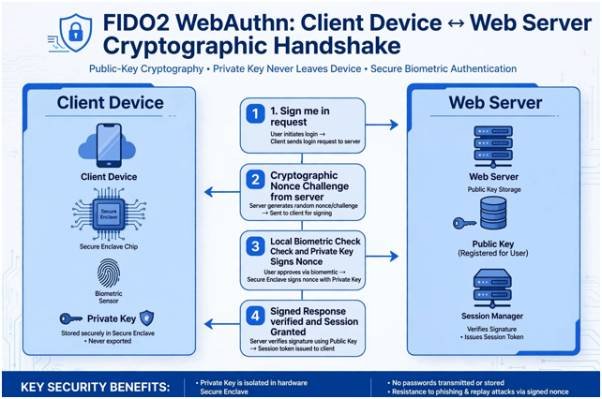
Traditional passwords rely on a shared secret model. You know the string, the remote server stores a cryptographic hash of it, and authentication requires transmitting that secret over the network. If an attacker intercepts your input or breaches the remote database, your account falls.
Passkeys, built on the open standards established by the FIDO Alliance, throw out shared secrets entirely. When you register a passkey, your device generates a public-private cryptographic key pair:
- The Public Key: Uploaded to the application server. It cannot be used to impersonate you.
- The Private Key: Stored locally in your device’s hardware Secure Enclave or an encrypted credential vault. It never leaves your possession.
Client Device Web Server
(Local Enclave) (Stores Public Key)
| |
| 1. “Sign me in” |
|————————————————->|
| |
| 2. Cryptographic Nonce (Challenge) |
|<————————————————-|
| |
[Local Biometric Check] |
[Private Key Signs Nonce] |
| |
| 3. Signed Cryptographic Response |
|————————————————->|
| |
| [Verifies Signature]
| 4. Session Granted |
|<————————————————-|
During login, the server sends a unique numeric challenge called a nonce. Your device verifies your identity locally via fingerprint, facial scan, or lock screen PIN. It then uses the private key to sign that challenge and returns the signature. The server validates the signature using your public key. At no point does a credential travel across the wire.
Why the Origin Binding Protocol Defeats Reverse-Proxy Phishing
In my testing lab, I set up an adversary-in-the-middle proxy framework designed to intercept session cookies and credentials. When directed against standard passwords and SMS one-time codes, the proxy captured everything.
Against a passkey, the attack collapsed instantly.
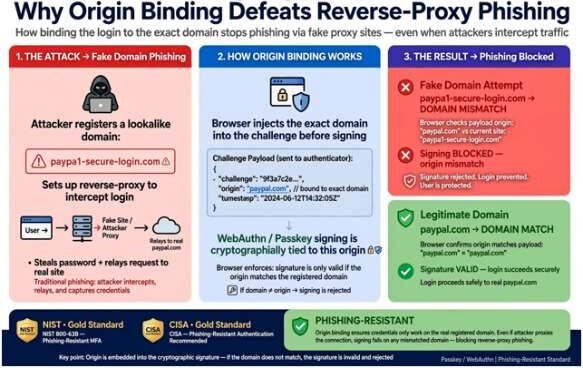
Passkeys enforce strict domain origin binding governed by NIST SP 800-63B Guidelines. The client browser automatically injects the exact domain name from the address bar into the challenge payload before signing.
If a scammer lures you to paypa1-secure-login.com, your browser notes the domain mismatch against the registered public key for paypal.com and refuses to sign.
The Cybersecurity and Infrastructure Security Agency (CISA) classifies FIDO-compliant authenticators as the gold standard for phishing resistance because human error cannot override this cryptographic handshake.
Head-to-Head Comparison: Security Vectors Analyzed
To evaluate real-world resilience, look at how both credential types perform across critical attack surfaces:
| Security Vector | Traditional Passwords | FIDO2 / WebAuthn Passkeys | Threat Mitigation Advantage |
| Adversary-in-the-Middle (Phishing) | Fails against spoofed proxy domains | Immune; origin check occurs at the browser layer | Eliminates credential harvest campaigns entirely |
| Server-Side Data Breaches | Leaked password hashes can be cracked offline | Server holds only public keys, useless to attackers | Zero credential exposure from database compromises |
| Credential Stuffing & Replay | High vulnerability due to user password reuse | Mathematically unique key pair per service | Rendered obsolete; no cross-service credential leakage |
| Keylogging & Screen Capture | Malware intercepts keystrokes in real time | Private keys require physical hardware confirmation | Bypasses operating system keylogging spyware |
| Authentication Velocity | 8–15 seconds plus MFA delays | Sub-3-second local biometric taps | 95%+ sign-in success rates with lower friction |
Where Passkeys Shift the Attack Surface
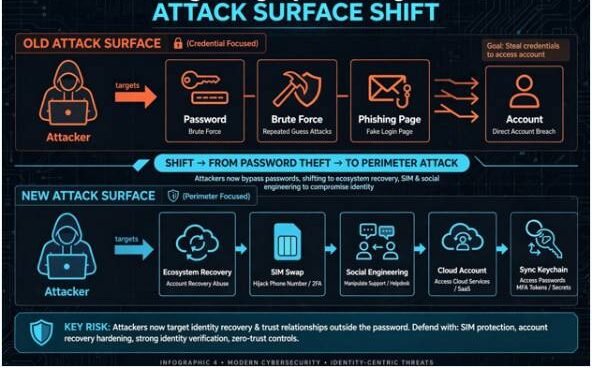
Passkeys are mathematically uncrackable with current computing infrastructure, but adopting them shifts attacker focus to your account perimeter and recovery mechanisms.
OLD ATTACK SURFACE (Credential Focused)
[Attacker] —> Targets Password / Brute Force / Phishing Page —> Account
NEW ATTACK SURFACE (Perimeter Focused)
[Attacker] —> Targets Ecosystem Recovery / SIM Swap / Social Engineering
|
v
Cloud Account / Sync Keychain
The Ecosystem Lockout Problem and Hardware Backups
Most users utilize synced passkeys through Apple iCloud Keychain, Google Password Manager, or enterprise vaults like 1Password and Bitwarden. These platforms encrypt keys during transit and store them across your devices.
The primary operational risk is losing access to your central account. If you lose your smartphone and laptop simultaneously, recovering synced credentials requires verified account fallbacks.
To eliminate this single point of failure:
- Enroll physical security keys: Register two dedicated FIDO2 hardware keys, such as YubiKeys, to your core accounts. Keep one key with your daily gear and store the second key in a fireproof home safe.
- Store offline emergency recovery codes: Generate paper-based recovery kits for your primary cloud provider and password manager vault. Keep these documents completely off-device.
- Deactivate vulnerable SMS fallbacks: Remove phone-number-based account reset channels that remain vulnerable to SIM-swap fraud.
Real-World Resilience: Protecting Your Wider Network Perimeter
Securing identity credentials is the most impactful step you can take, but authentication works within an ecosystem of connected infrastructure.
A compromised local router or IoT bridge creates rogue egress points that jeopardize session cookies once you are authenticated. When hardening a smart environment, learn how to secure smart home devices from hackers by isolating gadgets onto segregated VLANs.
Similarly, ensuring steady connectivity for authentication sync requires evaluating your network backbone. When configuring high-throughput infrastructure, review Ethernet backhaul vs. wireless backhaul to eliminate packet loss and keep device sync instantaneous across your home office hardware.
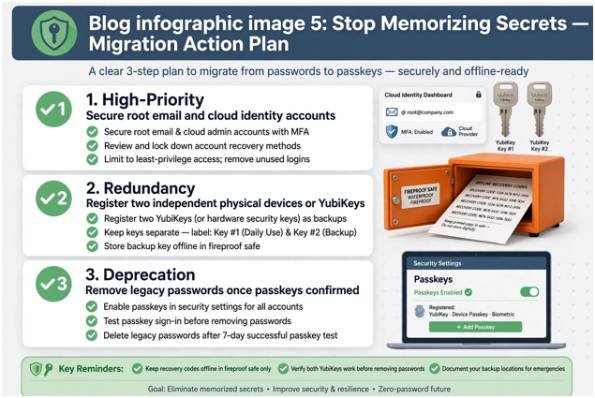
Stop Memorizing Secrets: Your Migration Action Plan
Transitioning away from passwords does not require an all-or-nothing leap. Take control of your security footprint by systematically upgrading your critical accounts:
+———————————————————————-+
| 1. High-Priority: Secure root email and cloud identity accounts. |
| 2. Redundancy: Register two independent physical devices or keys. |
| 3. Deprecation: Remove legacy passwords once passkeys are confirmed. |
+———————————————————————-+
- Target root accounts first: Open security settings in your primary email, cloud backup, and password manager. Enable passkeys and configure secondary hardware authenticators immediately.
- Audit fallback channels: Remove security questions, phone calls, and SMS verification options from any account supporting WebAuthn.
- Purge legacy credentials: Once your passkey authenticates reliably across your daily hardware, delete the old password from that account to close the legacy backdoor.
Frequently Asked Questions
1. What happens to my passkeys if I lose my phone?
Your passkeys automatically restore to a new device when you log into your encrypted cloud backup ecosystem (Apple, Google, or your dedicated password manager).
2. Can passkeys be infected or stolen by computer viruses?
No, malicious software cannot extract private keys because they are stored securely inside isolated hardware enclaves that never export raw cryptographic material.
3. Do passkeys require an active internet connection to work?
No, the challenge-signing process runs entirely on your local hardware device, so you can authenticate offline on local networks or secure offline devices.
4. Can a website track me across the internet using my passkey?
No, every passkey pair contains unique, randomly generated cryptographic numbers that share zero identifying linkages across different websites.









2 comments on “Are Passkeys Safer Than Passwords? A Field-Tested Security Guide”