
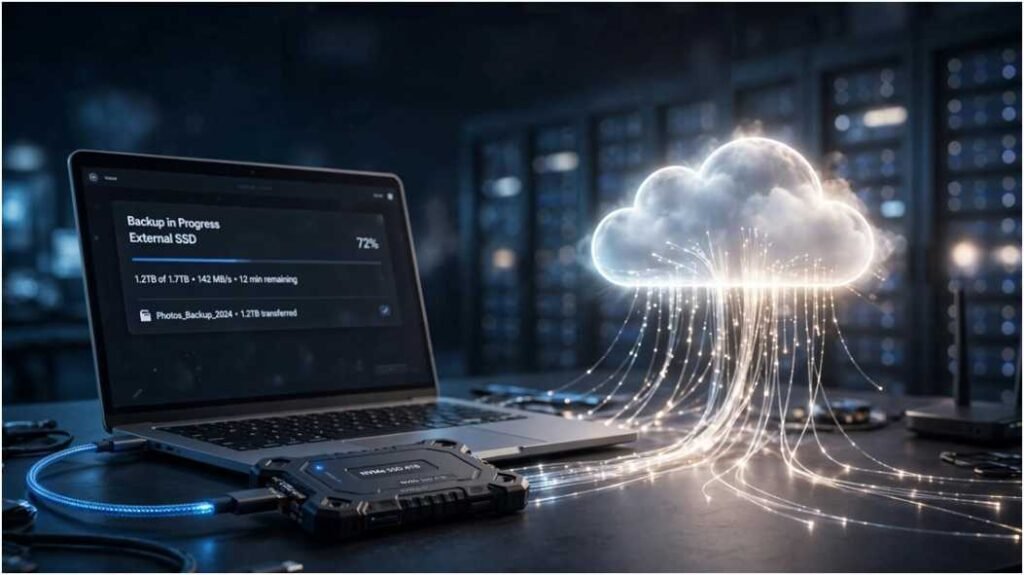
Choosing between an external ssd vs cloud storage for backups comes down to how quickly you need your data back when a drive fails. Last month, I restored a 1.2 TB video archive from both an NVMe external drive and an enterprise cloud bucket. The local drive finished in 14 minutes; the cloud download took nearly 4 hours over a fiber connection.
Both methods protect your data, but they solve entirely different problems. Local solid-state drives deliver raw transfer speeds and complete physical control. Cloud platforms offer offsite disaster recovery and hands-free automation. Finding the right balance requires evaluating your file sizes, bandwidth limits, and risk tolerance.
+————————————————————————-+
| CORE ATTRIBUTE MATRIX AT A GLANCE |
+———————-+————————-+————————+
| Feature | External SSD | Cloud Storage |
+———————-+————————-+————————+
| Interface Speed | 1,050 to 2,800 MB/s | 10 to 120 MB/s |
| Operating Mode | Direct USB/Thunderbolt | Internet required |
| Payment Model | Capital expense (once) | Monthly/yearly sub |
| Threat Vulnerability | Drops, fire, theft | Credential compromise |
| Offsite Protection | No (manual relocation) | Yes (native geo-redund)|
+———————-+————————-+————————+
Real-World Speed: USB-C NVMe vs Broadband Pipelines
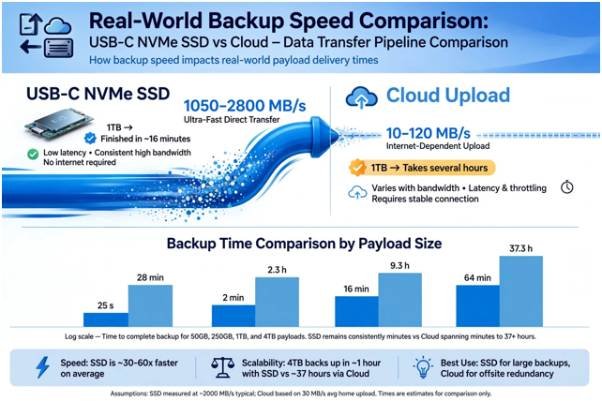
Transfer rates listed on retail packaging rarely match real backup performance. Real-world speeds depend on sustained controller throughput, cache saturation, and ISP upload caps.
Sustained Write Speeds Under Heavy Payloads
Modern USB 3.2 Gen 2 and Thunderbolt drives claim burst speeds above 2,000 MB/s. However, moving hundreds of small files or huge 4K media renders exposes drive limitations.
During heavy transfers, drives exhaust their pseudo-SLC cache and drop to native TLC/QLC NAND write speeds, averaging 400 to 700 MB/s. Even with that drop, a 500 GB system image transfers in under 15 minutes. Independent evaluations from Wirecutter Storage Tests confirm that direct bus connections consistently outperform remote network backups during bulk data writes.
The ISP Upload Bottleneck
Cloud storage throughput is fundamentally restricted by internet infrastructure. Most residential internet connections feature asymmetric speeds: you might download at 1 Gbps, but upload at just 40 Mbps.
Uploading that same 500 GB system image over a 40 Mbps link takes over 28 hours of uninterrupted bandwidth. Even on symmetrical gigabit fiber, real-world cloud uploads cap out around 80 to 110 MB/s due to TLS handshakes, data packetization, and server ingest throttles.
| Backup Payload Size | USB 3.2 Gen 2 SSD (1,050 MB/s) | Gigabit Fiber Cloud (1 Gbps Symmetrical) | Asymmetric Cable Cloud (40 Mbps Upload) |
| 50 GB (Documents, Catalogs) | ~48 seconds | ~7 minutes | ~2.8 hours |
| 250 GB (Photo Library, RAW) | ~4 minutes | ~35 minutes | ~14 hours |
| 1 TB (Full System Image) | ~16 minutes | ~2.3 hours | ~56 hours |
| 4 TB (Multi-cam 4K Footage) | ~1.1 hours | ~9.2 hours | ~224 hours |
Total Cost of Ownership: One-Time Hardware vs Subscriptions
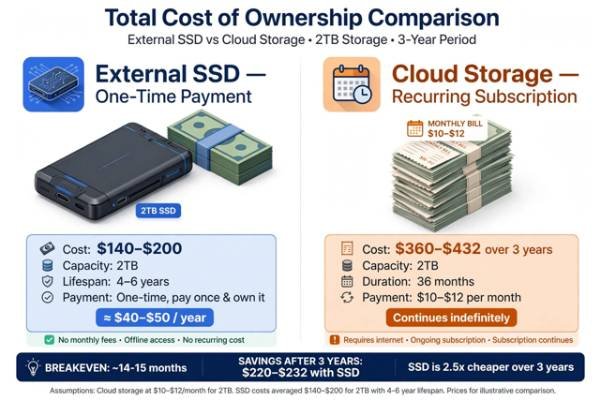
Hardware requires an upfront cash outlay, whereas cloud platforms charge ongoing operational fees. The best financial choice depends on your storage horizon and data growth.
An external 2 TB rugged SSD costs between $140 and $220. That drive provides immediate, fast local storage for roughly four to six years with no additional bills. Understanding how to extend the lifespan of an SSD by managing write cycles and controlling thermals ensures you maximize your return on hardware.
Cloud subscriptions distribute costs over time but never stop billing. Consumer cloud plans charge $10 to $12 monthly for 2 TB tiers. Over three years, you pay upwards of $360. For collections exceeding 10 TB, enterprise cold-storage fees compound quickly with data egress costs.
| Storage Capacity | External SSD (Upfront Cost) | Cloud Tier (Year 1 Cost) | Cloud Tier (3-Year Cumulative) |
| 1 TB | $80 – $110 | $70 – $84 | $210 – $252 |
| 2 TB | $140 – $200 | $120 – $144 | $360 – $432 |
| 4 TB | $280 – $360 | $240 – $300 | $720 – $900 |
| 8 TB | $600 – $800 | $480 – $600 | $1,440 – $1,800 |
Threat Modeling: Ransomware, Bit Rot, and Hardware Decay
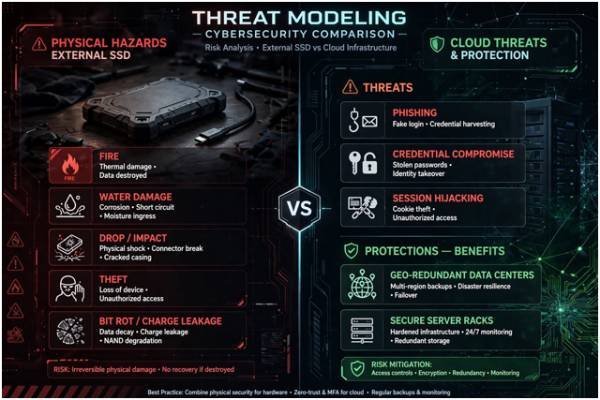
Backups serve to protect your data from catastrophic loss. Evaluating threats determines whether physical hardware or cloud architecture provides better security.
Physical Hazards and Component Health
An SSD resting on your desk remains vulnerable to water damage, accidental drops, house fires, and theft. If a single disaster strikes your workspace, your workstation and local backup can vanish simultaneously.
Unpowered solid-state drives also suffer from charge leakage over long intervals. Engineering guidelines published by Crucial SSD Tech Specs & NAND Longevity emphasize that NAND flash cells require periodic electrical refreshing to prevent passive data degradation, commonly known as bit rot.
Account Compromise and Cloud Resiliency
Cloud providers store your files across multi-region, geo-redundant data centers. Enterprise facilities withstand localized power outages, fires, and natural disasters without risking data integrity. Data hardware analyses from Backblaze Drive Stats confirm modern distributed cloud pools provide resilience far superior to single-drive operations.
However, cloud storage exposes your data to remote threats like session hijacking, credential stuffing, and phishing. Securing cloud dashboards with multi-factor authentication is essential; evaluating whether are passkeys safer than passwords helps eliminate the primary vulnerability of remote backups.
Physical isolation remains an effective defense: an unplugged external SSD is completely immune to online ransomware and server breaches.
The Hybrid 3-2-1 Strategy: Merging Local Speed with Offsite Safety
Treating storage as an either-or choice exposes your files to preventable loss. The CISA Data Backup Guidance recommends the classic 3-2-1 backup framework. You keep three copies of your data across two different media types, with one stored offsite.
PRIMARY WORKSTATION
(Working Data Source)
|
+——————+——————+
| |
v v
[LOCAL SSD TIER] [CLOUD REPOSITORY]
Fast Snapshot Recovery Automated Offsite Backup
– 10-15 Min Full Restores – S3 Glacier / Backblaze / B2
– Daily Delta Clones – Versioned Deduplication
– Air-gapped between tasks – Always-on Ransomware Shield
Route heavy, frequently modified assets—like scratch projects and active media catalogs—to a fast local SSD. Simultaneously, run background software to sync active project snapshots and sensitive text records to an encrypted cloud repository. This hybrid model delivers the low-latency recovery of solid-state hardware alongside the disaster-proof safety of remote cloud infrastructure.
Frequently Asked Questions
1. Can an external SSD completely replace cloud storage?
No, because an SSD remains vulnerable to local theft, physical impacts, and site disasters like fires or floods.
2. How long does data survive on an unplugged SSD?
Unpowered SSDs retain data safely for roughly one to two years before cell charge leakage risks bit rot.
3. Does cloud storage back up files automatically without intervention?
Yes, cloud clients continuously monitor local directories and upload modified files in the background without user intervention.
4. Is cloud storage vulnerable to local ransomware attacks?
Cloud data remains safe if your provider supports file versioning or immutable object locking to roll back unauthorized changes.
Ditch the False Binary: Build Your Resilient Pipeline
Relying solely on a desk drive risks physical disaster; banking entirely on the cloud leaves you stranded behind slow upload speeds and recurring subscriptions. Plug a portable SSD into your setup for instant, full-system snapshots you control.
Pair it with an automated, zero-knowledge cloud account for your irrecoverable documents and financial assets. You gain rapid system recovery alongside offsite security, giving you complete data protection.








