
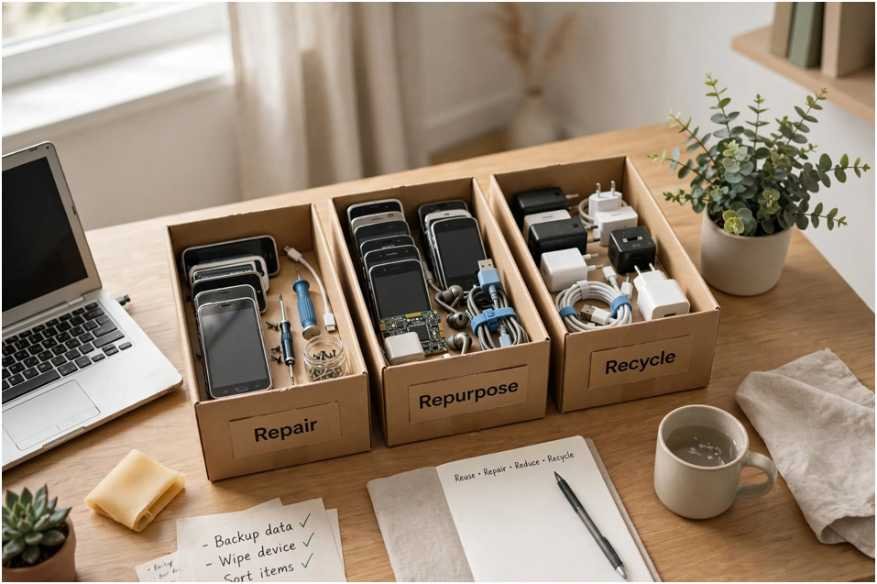
Every retired smartphone, laptop, and charging brick gathering dust in your drawers represents a missed opportunity to conserve critical resources. Learning how to reduce electronic waste from old devices kept my home office from turning into an electronics graveyard while slashing my personal carbon footprint.
According to the Global E-waste Monitor by UNITAR, the world generated 62 million metric tonnes of electronic waste in 2022 alone, with less than a quarter formally documented as collected and recycled.
Tossing gadgets into standard garbage bins leaks neurotoxins like lead and mercury into groundwater systems. You do not need to swear off buying new tech entirely. You simply need a disciplined system to extend device lifespans, re-engineer working hardware, and properly channel dead units to certified recyclers.
Triage Before Trash: How I Decide a Device’s True End of Life
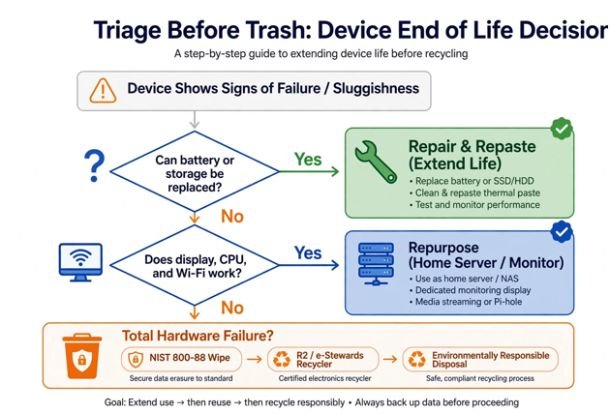
Before disposing of any machine, I evaluate whether sluggishness stems from dead silicon or unoptimized software. Modern consumer electronics often suffer from artificial obsolescence rather than terminal component failure.
[ Device Shows Signs of Failure / Sluggishness ]
│
Can battery or storage be replaced?
├── Yes ──> Repair & Repaste (Extend Life)
└── No
│
Does the display, CPU, and Wi-Fi work?
├── Yes ──> Repurpose (Home Server / Monitor)
└── No
│
Total Hardware Failure?
└──> NIST 800-88 Wipe ──> R2 / e-Stewards Recycler
Hardware Lifespan Diagnostics
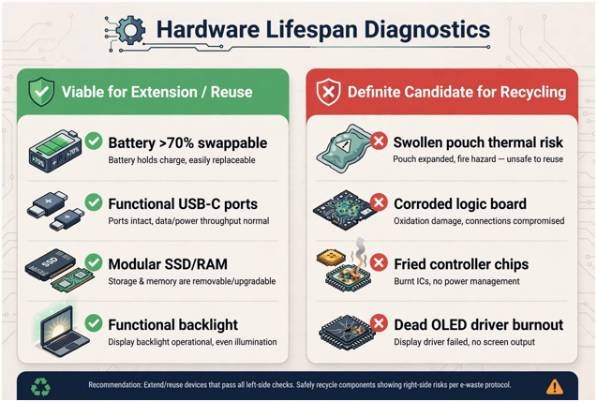
To prevent functional hardware from entering the waste stream prematurely, I use a diagnostic triage framework:
| Diagnostic Factor | Viable for Extension / Reuse | Definite Candidate for Recycling |
| Battery Health | Capacity > 70%; easily swappable pack | Swollen pouch; severe thermal runaway risk |
| I/O Connectivity | Functional USB-C or legacy display outputs | Corroded logic board traces; dead power delivery |
| Compute / Storage | Modular SSD/RAM or usable Wi-Fi network chip | Fried controller chips; NAND flash failure |
| Display Panel | Functional backlight; cosmetic glass cracks | Completely dead OLED panel; driver board burnout |
When evaluating older phones that burn through charge rapidly, investigate underlying factors before assuming the battery is shot; for instance, modern mobile setups introduce connectivity nuances, and checking whether does esim drain more battery than physical sim can help pinpoint software-level drains.
Extending Hardware Lifespans Through Proactive Maintenance
The most sustainable gadget is always the one you already own. Keeping hardware operating within optimal thermal and chemical thresholds doubles its lifespan.
Thermal Care and Battery Preservation
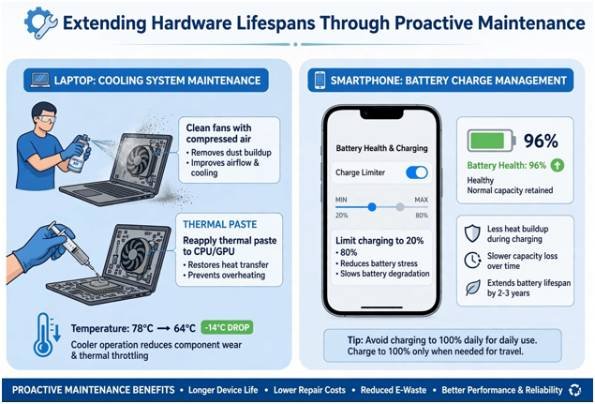
Heat kills processing chips and lithium-ion batteries. Once a year, I open my laptops, clear the intake fans using compressed air, and reapply thermal paste to the CPU and GPU dies. On a five-year-old workstation, replacing dried thermal compound dropped my load temperatures by 14°C. That simple fix eliminated severe thermal throttling and stopped me from buying an unnecessary upgrade.
Lithium chemistry degrades quickest when stored at maximum voltage. Keep your operational charge levels between 20% and 80%. Most modern desktop operating systems and phones now include charge-limiting toggles. Turning on these battery-protection settings prevents premature degradation and swelling.
Storage Hygiene and OS Modernization
When solid-state storage fills past 85% capacity, write speeds drop drastically due to elevated write amplification. Offload inactive archives to cloud storage or an external drive. If you manage a desk setup with multiple peripherals and drives, optimizing your cable standards—such as understanding Thunderbolt 4 vs. USB4 for external monitors—keeps high-resolution setups running smoothly on older host machines.
If a machine loses official vendor operating system updates, install a lightweight Linux distribution such as Ubuntu LTS or ChromeOS Flex. Linux turns ten-year-old dual-core laptops into nimble web browsers and document workstations.
Repurposing and Upcycling Retired Hardware
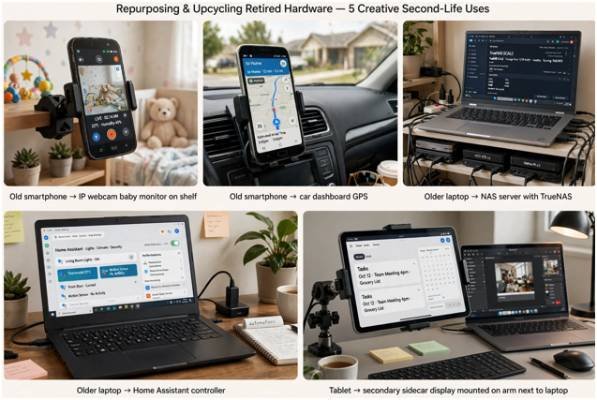
A retired primary daily driver can transition into an excellent secondary utility appliance.
Second-Life Configurations for Old Phones and Laptops
Rather than leaving an old device in a drawer, match its components to a practical home utility role:
| Hardware Type | Repurposed Application | Necessary Software / Tweaks |
| Old Smartphone | Local IP Webcam or Baby Monitor | AlfredCamera, DroidCam; run on a smart plug timer |
| Old Smartphone | Dedicated Automotive Dashboard/GPS | Android Auto standalone, Apple Maps; offline maps enabled |
| Older Laptop | Network Attached Storage (NAS) | TrueNAS Core, OpenMediaVault; disabled display panel |
| Older Laptop | Home Automation Controller | Home Assistant OS; low-power background background daemon |
| Tablet | Secondary Sidecar System Display | Spacedesk, Duet Display; mounted via adjustable arm |
If the hardware is still fully functional but you have no upcycling use for it, donate it. Local schools, domestic violence shelters, and non-profits gladly accept functional hardware. Organizations like iFixit also provide open repair manuals to help hobbyists revive machines that charities can deploy.
Responsible Recycling and Certified End-of-Life Disposal
When silicon chips suffer irreversible physical failure, you must divert the components to professional material-recovery channels.
+——————————————————————–+
| SAFE DEVICE RETIREMENT PROTOCOL |
| |
| [Step 1: Backup] Sync data to external SSD or Cloud |
| [Step 2: Sign-Out] Deregister iCloud, Google, & BitLocker |
| [Step 3: Sanitization] Run ATA Secure Erase or NIST 800-88 Purge |
| [Step 4: Logistics] Deliver to verified R2 or e-Stewards depot |
+——————————————————————–+
Data Sanitization Beyond the Basic Factory Reset
Never surrender a storage device without properly sterilizing the medium. Basic factory resets often leave residual data tables intact on older storage drives.
Follow the media sanitization guidelines published by the National Institute of Standards and Technology (NIST SP 800-88). On solid-state drives, execute an ATA Secure Erase or enable whole-disk hardware encryption (BitLocker or FileVault) before resetting. Doing so scrambles the underlying cryptographic key, ensuring forensic recovery attempts recover nothing but scrambled garbage.
Navigating Certified R2 and e-Stewards Facilities
Avoid municipal curbside scrap piles, which frequently export toxic trash abroad under unregulated conditions. Look for drop-off programs vetted under either R2 (Responsible Recycling) or e-Stewards standards, both recommended by the U.S. Environmental Protection Agency (EPA).
| Certification Standard | Governing Body | Primary Recycling Focus |
| R2v3 Standard | SERI | Focuses on material tracking, downstream chain-of-custody, and hardware refurbishment. |
| e-Stewards | Basel Action Network | Strictly prohibits toxic waste export to developing nations and incineration disposal. |
Retail chains like Best Buy and Staples run continuous collection kiosks accepting cables, old monitors, and lithium cells at zero charge.
Frequently Asked Questions About E-Waste Reduction
1. Can I throw away swollen lithium-ion batteries at regular drop-off kiosks?
No; swollen batteries present serious thermal fire risks and require immediate isolation inside sand-lined hazardous drop boxes.
2. Does a standard factory reset protect my financial information?
A basic reset deletes file pointers, whereas NIST 800-88 cryptographic erasure securely overwrites stored memory cells completely.
3. Do electronics manufacturers offer incentives for recycling dead tech?
Most major electronics brands provide direct trade-in gift cards or discounts when returning eligible obsolete hardware.
4. How does e-waste harm local environments?
Discarded circuit boards release heavy metals into surrounding soils, where they wash into groundwater and food supplies.
Don’t Let Your Tech Gather Dust: Your Next Move
Electronics left abandoned in desk drawers gradually become toxic junk as their batteries degrade and leak over time. Pick one unused gadget from your shelf today: inspect the battery, back up the local data, and decide whether it deserves a Linux-based second life or a direct trip to an R2-certified bin. Taking control of your hardware lifecycle saves real money and keeps dangerous refuse out of our shared soil.








