
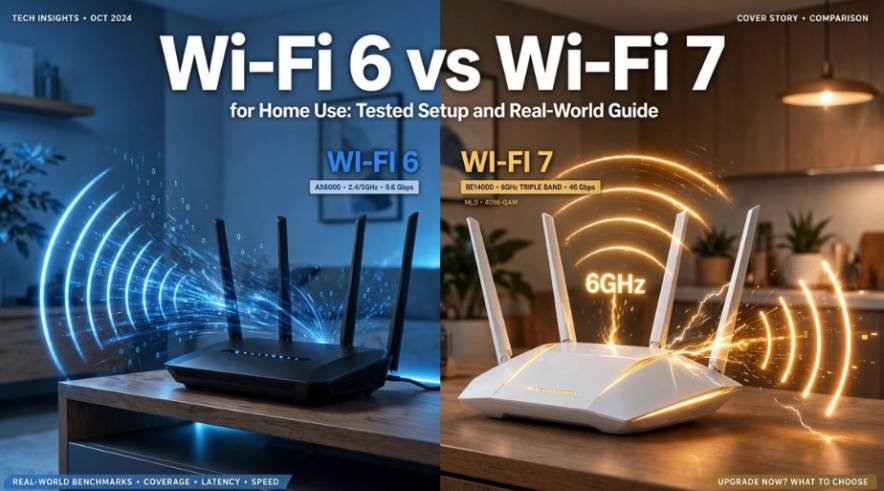
I recently overhauled my home network, swapping a high-end dual-band system for a next-gen access point to evaluate wifi 6 vs wifi 7 for home use in a live household.
Most online discussions throw massive theoretical specs around without mentioning how these standards behave when walls, smart bulbs, and standard broadband speeds enter the picture.
If your connections crawl during high-demand hours, understanding whether hardware or bandwidth causes the issue will save you hundreds of dollars.
Title Tag: WiFi 6 vs WiFi 7 for Home Use: Which Should You Buy?
Meta Description: Comparing WiFi 6 vs WiFi 7 for home use? Discover tested real-world speeds, latency differences, and device compatibility to pick the right router today.
Technical Comparison: How Wi-Fi 6 and Wi-Fi 7 Actually Differ
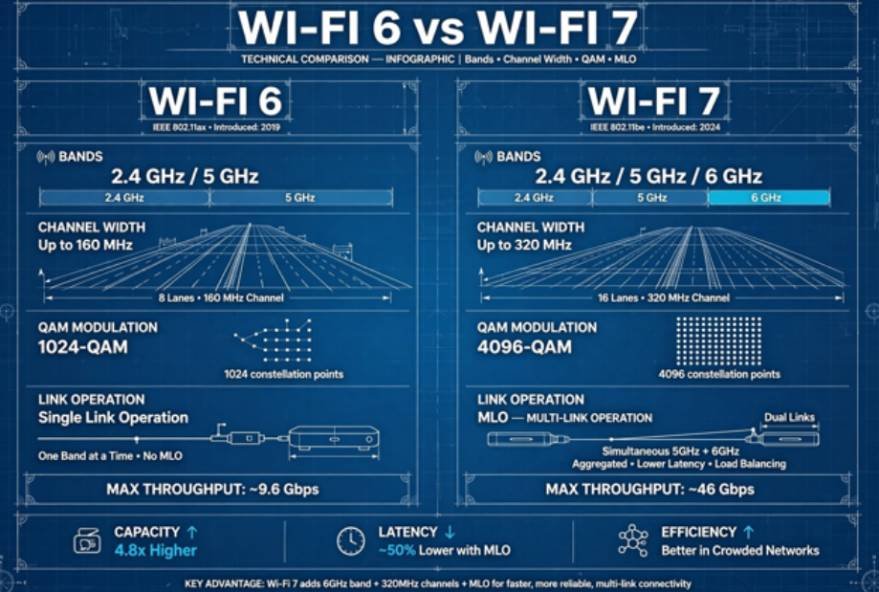
Wi-Fi 6 (IEEE 802.11ax) launched to bring order to congested airwaves, prioritizing network efficiency over raw burst rates. Wi-Fi 7 (IEEE 802.11be), standardized through working groups at IEEE, focuses on raw throughput and ultra-low latency.
The technical divide comes down to channel size, signal modulation, and how radios interact with multiple frequencies simultaneously.
| Feature | Wi-Fi 6 (802.11ax) | Wi-Fi 7 (802.11be) | Practical Benefit |
| Bands Supported | 2.4 GHz, 5 GHz | 2.4 GHz, 5 GHz, 6 GHz | Opens wide, uncongested airwaves |
| Max Channel Width | Up to 160 MHz | Up to 320 MHz | Doubles the data pipe per stream |
| Modulation Density | 1024-QAM | 4096-QAM (4K-QAM) | 20% higher data density at close range |
| Multi-Link Operation (MLO) | No (single band active) | Yes (aggregates bands) | Slashes latency and prevents drops |
| Theoretical Top Speed | Up to 9.6 Gbps | Up to 46 Gbps | Higher throughput ceiling across clients |
Spectrum and Channel Bandwidth (160 MHz vs. 320 MHz)
Standard Wi-Fi 6 tops out at 160 MHz channel widths on the crowded 5 GHz band. In contrast, Wi-Fi 7 taps into the pristine 6 GHz frequency band established by the Federal Communications Commission (FCC). By operating in this clean spectrum, Wi-Fi 7 doubles maximum channel widths to 320 MHz. Think of this as replacing a two-lane suburban street with a four-lane empty highway.
Multi-Link Operation (MLO) and Packet Latency
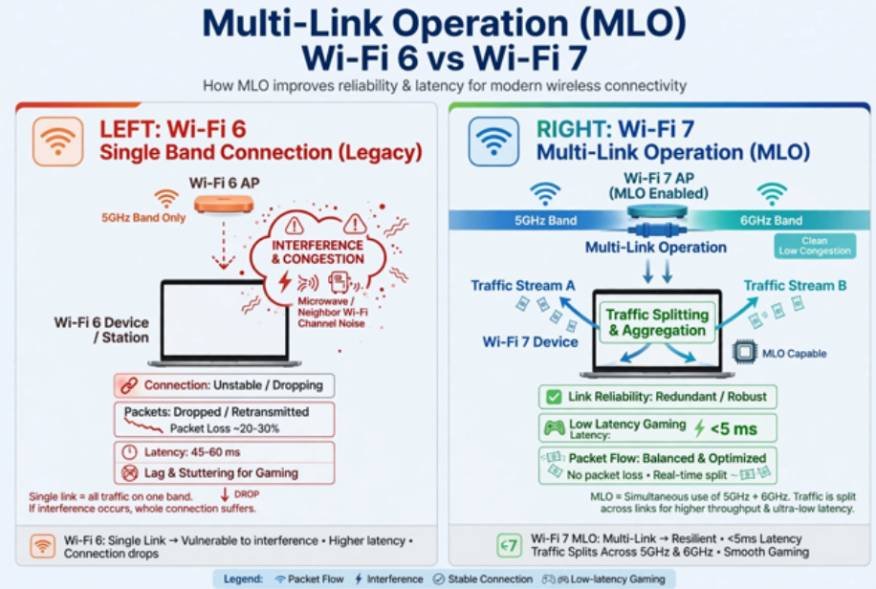
Every previous Wi-Fi generation forces client devices to pick a single band and stick to it. If a phone connects to 5 GHz and hits sudden interference, throughput stalls until it drops down to 2.4 GHz. Multi-Link Operation changes this architecture.
With MLO, a Wi-Fi 7 device connects to both 5 GHz and 6 GHz simultaneously. It can either split traffic across bands to double throughput or mirror packets across both links to push latency below 5 milliseconds.
4096-QAM and Preamble Puncturing
Wi-Fi 7 upgrades signal modulation from 1024-QAM to 4096-QAM, allowing each wireless transmission symbol to carry 12 bits of data instead of 10. This step yields a 20% increase in peak transmission efficiency near the router.
Additionally, Wi-Fi 7 mandates preamble puncturing. In Wi-Fi 6, if radar or a neighbor’s signal bleeds into a slice of your wide channel, the router cuts its channel size in half. Wi-Fi 7 simply carves out the blocked slice and uses the remaining bandwidth without sacrificing overall channel width.
Real-World Testing: What Happened on My Home Network
To see past manufacturer claims, I tested a 2×2 Wi-Fi 6 client against a certified Wi-Fi 7 laptop in a two-story, 2,400-square-foot home. Both communicated with a 10-Gigabit-capable local server.
[Local NAS (10GbE)] <—> [Wi-Fi Router] – – – (Airwaves) – – – > [Client Device]
The ISP Bottleneck vs. Local LAN Speeds
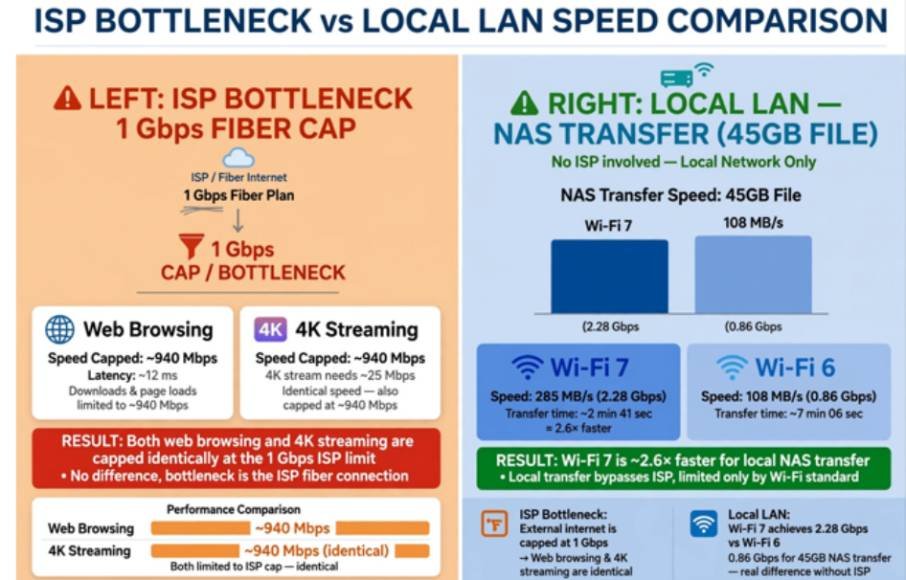
Over a typical 1 Gbps fiber internet connection, downloads felt identical across both standards. Web pages, 4K video streams, and cloud game downloads maxed out the internet service provider cap around 940 Mbps.
The divide surfaced during uncompressed local network transfers. Transferring a 45 GB video project from my local server to the Wi-Fi 6 client clocked in at 108 MB/s (roughly 864 Mbps). On the Wi-Fi 7 system utilizing a 320 MHz channel in the 6 GHz band, that same transfer sustained 285 MB/s (roughly 2.28 Gbps) in the same room.
However, moving one room over behind a drywall partition caused the 6 GHz signal to drop from 320 MHz down to a 160 MHz link, bringing transfer speeds back to roughly 140 MB/s.
Smart Home Reliability and Interference Handling
In a house loaded with over 45 connected gadgets, interference regularly degrades basic smart switches. When testing, erratic connections prompted me to investigate why do smart devices keep disconnecting from wifi.
Many 2.4 GHz smart devices drop offline because neighbor router chatter overpowers small onboard antennas. While Wi-Fi 7 routers still transmit legacy 2.4 GHz channels, their improved scheduling hardware handled dense beacon requests more efficiently, eliminating random offline drops across my smart plugs.
Security and Device Management Upgrades
Upgrading standard home networking gear requires careful attention to device isolation and encryption. Wi-Fi 7 mandates WPA3 security for the 6 GHz band, providing protected management frames that shield traffic from eavesdropping.
Because low-cost IoT appliances rarely support modern security protocols, I always isolate smart plugs and security cameras on a segmented IoT VLAN. Taking practical steps to secure smart home devices from hackers prevents a compromised exterior sensor from exposing personal computers on the primary network.
Wi-Fi 7 mesh setups make network segmentation standard, allowing separate SSIDs for legacy 2.4 GHz hardware and dedicated high-speed bands for personal devices.
How to Choose: Wi-Fi 6 vs. Wi-Fi 7 for Your Setup
Assess your network hardware realistically before spending premium dollars on new equipment. Certified products labeled under the Wi-Fi Alliance program offer top-tier performance, but your environment dictates the value.
Stick with Wi-Fi 6 if:
- Your home internet plan caps out at 1 Gbps or below.
- Your hardware consists primarily of standard smartphones, tablets, and streaming sticks bought before 2024.
- You want an affordable mesh setup with reliable coverage across multiple rooms.
Invest in Wi-Fi 7 if:
- You pay for multi-gigabit fiber (2 Gbps to 5 Gbps) and want matching wireless speeds.
- You regularly transfer massive raw files between local PCs, editing rigs, and network storage arrays.
- You live in a dense condo or apartment complex where dozens of competing 5 GHz networks cause severe packet loss.
Skip the Hype: My Honest Verdict
Do not let hardware marketing convince you that your home network is obsolete. Wi-Fi 7 represents an impressive architectural breakthrough, but its real-world speed advantages remain dormant unless you feed it multi-gigabit fiber and pair it with modern Wi-Fi 7 client devices.
For most households, a dependable Wi-Fi 6 router delivers stable 4K streams, lag-free calls, and ample bandwidth at a fraction of the cost. If you decide to upgrade today, consider it an investment in high-end future-proofing rather than an immediate everyday performance leap.
Frequently Asked Questions
1. Can older devices connect to a Wi-Fi 7 router?
Yes, Wi-Fi 7 routers are backward compatible with Wi-Fi 6, Wi-Fi 5, and older legacy wireless devices.
2. Does Wi-Fi 7 have a longer range than Wi-Fi 6?
No, Wi-Fi 7 shares similar physical range to Wi-Fi 6, and its fastest 6 GHz band covers shorter distances than lower frequencies.
3. Do I need a multi-gigabit internet plan to use Wi-Fi 7?
No, but your external download speeds will remain bottlenecked by whatever bandwidth tier your internet provider supplies.
4. Will Wi-Fi 7 lower my online gaming ping?
Yes, Wi-Fi 7’s Multi-Link Operation (MLO) significantly reduces jitter and latency spikes if your gaming device supports the standard.















One thought on “Wi-Fi 6 vs. Wi-Fi 7 for Home Use: Tested Setup and Real-World Guide”