
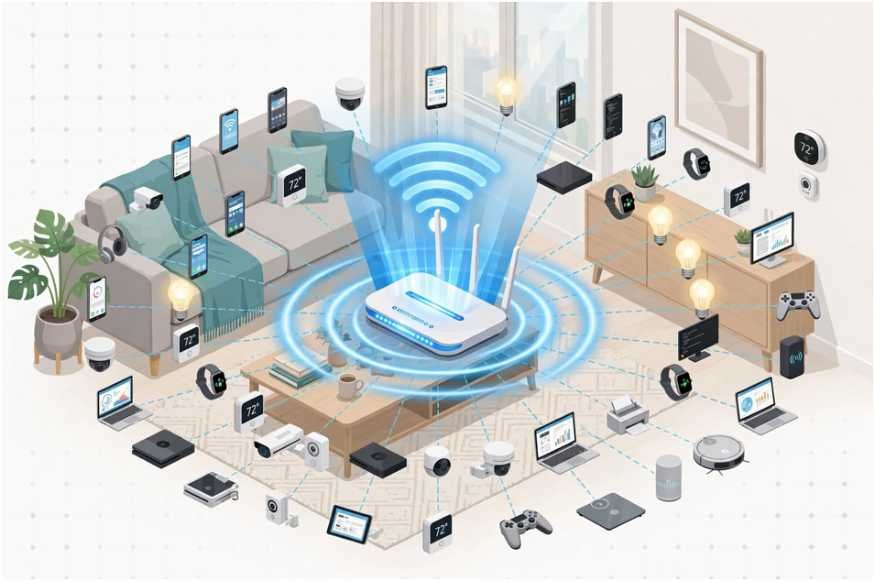
Your home Wi-Fi drops out right during an important video call, yet your internet speed test shows plenty of bandwidth. That frustrating lag usually is not an internet outage. It happens when your network exceeds its concurrent connection threshold.
If you want to know how many devices can a home router handle, the short answer is that most modern dual-band routers comfortably support 20 to 50 active devices at once. However, theoretical limits allow up to 253 connections, while cutting-edge hardware pushes past 200.
The exact ceiling depends on your router’s wireless generation, internal processor, and what those devices do every second.
The Three Hard Limits: Theoretical, Hardware, and Bandwidth
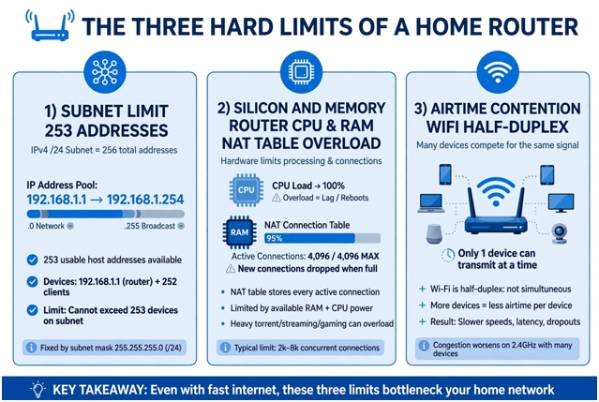
Every home router faces three distinct bottlenecks. Understanding where your network falls keeps your gadgets running smoothly.
1. The Subnet Limit: 253 Theoretical Addresses
Most home networking gear uses a standard /24 subnet mask (255.255.255.0) assigning private IPv4 addresses from 192.168.1.1 to 192.168.1.254. Because 192.168.1.1 serves as your default gateway and .255 is reserved for network broadcasting, the pool mathematically caps at 253 usable addresses. Official networking standards documented by manufacturers like Linksys clarify this address pool ceiling.
However, network capacity is not just an addressing exercise. While you can expand a subnet mask to create thousands of virtual slots, consumer hardware will crash long before reaching those numbers.
2. Silicon and Memory: Why Router RAM Crashes First
Every active network connection requires an entry in your router’s Network Address Translation (NAT) table. When smart plugs, smartphones, and laptops make outbound requests, your router’s CPU and RAM must track every open state.
Entry-level gateways supplied by Internet Service Providers typically feature low-cost dual-core processors and 128 MB to 256 MB of RAM. Once connection states exceed memory buffers—often triggered by peer-to-peer applications or dozens of chatty smart devices—the router freezes. Premium units pack quad-core chips and 1 GB of memory to prevent bufferbloat.
3. Airtime Contention and ISP Bandwidth
Wi-Fi is a half-duplex medium: only one device can transmit on a shared channel at a microsecond interval. When 40 devices broadcast simultaneously, they compete for “airtime,” causing latency spikes even if raw download capacity remains unused.
Furthermore, your internet speed tier sets the absolute ceiling for external traffic. The Federal Communications Commission (FCC) baseline standard for broadband speeds sits at 100 Mbps download and 20 Mbps upload, but device-dense households require far more headroom to prevent packet queueing.
Real-World Capacity Across Wi-Fi Generations
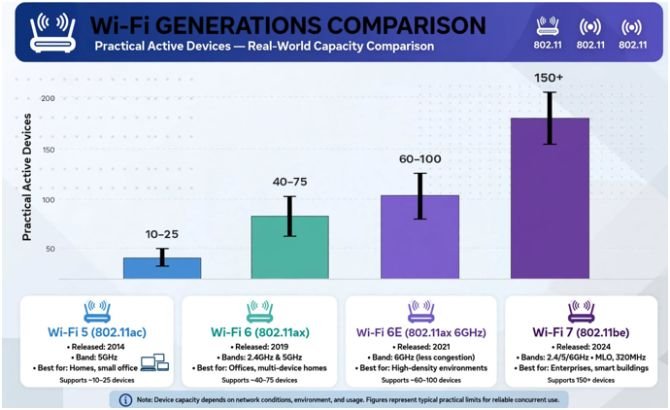
Wi-Fi protocols dictate how efficiently your router talks to multiple antennas at the same time. Here is what each standard reliably handles in daily operation:
| Wi-Fi Standard | Typical Band | Max Theoretical Speed | Practical Active Devices | Primary Bottleneck |
| Wi-Fi 5 (802.11ac) | 2.4 GHz, 5 GHz | Up to 3.5 Gbps | 10–25 devices | Half-duplex airtime contention |
| Wi-Fi 6 (802.11ax) | 2.4 GHz, 5 GHz | Up to 9.6 Gbps | 40–75 devices | Total ISP bandwidth |
| Wi-Fi 6E (802.11ax Extended) | 2.4 GHz, 5 GHz, 6 GHz | Up to 9.6 Gbps | 60–100 devices | Hardware processing power |
| Wi-Fi 7 (802.11be) | 2.4 GHz, 5 GHz, 6 GHz | Up to 46 Gbps | 150+ devices | Household client capability |
As the Wi-Fi Alliance notes, modern standards deploy Orthogonal Frequency-Division Multiple Access (OFDMA) and Multi-User MIMO (MU-MIMO).
These technologies slice channels into smaller sub-carriers, allowing a router to service up to 30 low-power clients simultaneously rather than queuing them sequentially.
If you are debating a hardware upgrade for dense environments, evaluating wifi 6 vs wifi 7 for home use helps determine whether Multi-Link Operation (MLO) fits your workload.
High-Demand Streams vs. Smart Home Idle Loads
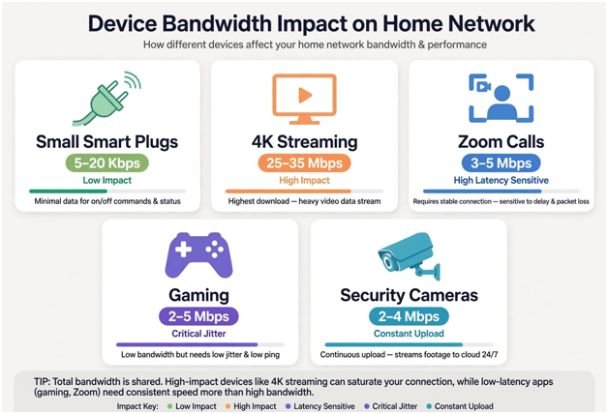
Not all connected devices tax your network equally. Fifty smart sensors sending tiny telemetry packets consume less processing overhead than three devices streaming uncompressed 4K video.
| Activity / Device Type | Typical Bandwidth Needed | NAT Table Impact | Network Congestion Level |
| Smart Plugs / Bulbs | 5–20 Kbps | High (Frequent heartbeat pings) | Low |
| 4K HDR Video Streaming | 25–35 Mbps | Moderate | High |
| Zoom / Video Calls | 3–5 Mbps (Symmetrical) | Moderate | High (Latency sensitive) |
| Online Gaming | 2–5 Mbps | Low | Critical (Jitter sensitive) |
| Cloud Security Cameras | 2–4 Mbps continuous upload | Constant | High (Saturates upload lanes) |
How I Optimized My Own 60-Device Smart Home
When my home network crossed 60 connected clients—including smart thermostats, tablets, laptops, and outdoor cameras—my Wi-Fi 5 router began dropping connections daily. The solution did not require a commercial-grade data rack.
First, I separated the frequency bands. I moved every low-bandwidth smart appliance to a dedicated 2.4 GHz network. This preserved the cleaner, faster 5 GHz and 6 GHz spectrums exclusively for gaming rigs, work laptops, and streaming pucks.
Next, I wired every static client using Cat6 Ethernet. Offloading Apple TVs, game consoles, and desktop rigs to physical cables cleared half-duplex wireless airtime instantly. If you experience signal drops in distant rooms, learning to find wifi dead zones at home ensures your access points distribute device density across balanced radios rather than overburdening a single access point.
Frequently Asked Questions
1. Does having too many devices slow down Wi-Fi?
Yes, excess devices cause packet collisions and airtime contention, which increases latency and reduces available speeds for everyone.
2. How do I know if my router is overloaded?
Frequent Wi-Fi disconnections, high ping during online games, and a physically hot router chassis indicate resource overload.
3. Can a mesh system support more devices than a single router?
Yes, mesh systems distribute processing tasks and wireless airtime across multiple dedicated hardware nodes.
4. Will adding an Ethernet switch increase my Wi-Fi device limit?
An unmanaged switch adds wired ports to free up wireless airtime, but it does not expand your router’s core CPU processing limits.
Stop Blaming Your ISP and Reclaim Your Bandwidth
Network instability rarely stems from an inadequate incoming internet line. More often, your hardware simply cannot negotiate the chaotic demands of multiple simultaneous radios.
Check your router’s administrative console today. Audit your connected client list, disconnect unused legacy gear, assign low-priority hardware to the 2.4 GHz radio, and wire high-throughput devices over Ethernet. Your connected home will feel instantly faster without spending extra cash on your monthly internet bill.









2 comments on “How Many Devices Can a Home Router Handle?”