
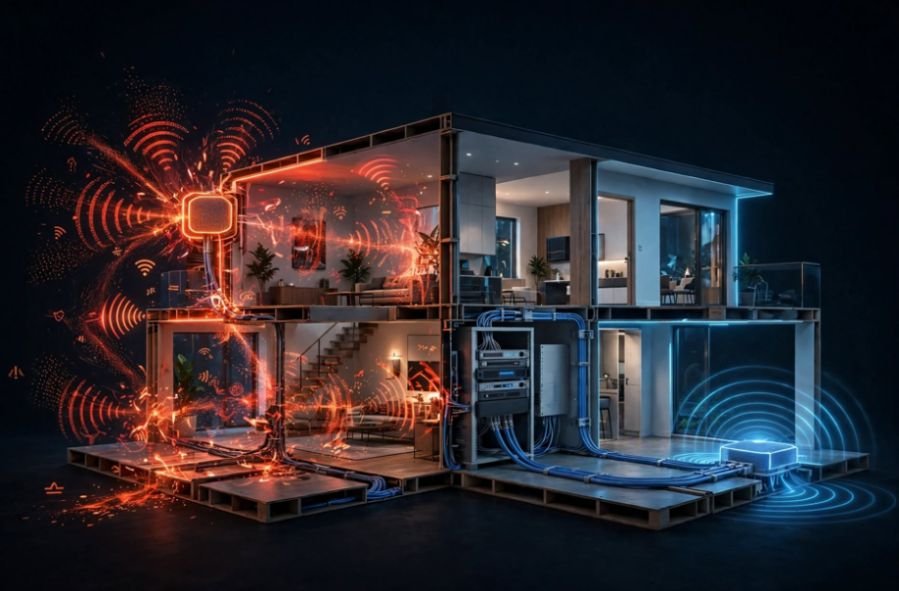
I spent years troubleshooting dropouts across my two-story house before realizing my wireless satellite nodes were fighting each other for scraps of radio spectrum. If your mesh network drops packets during video calls or caps your gigabit fiber plan at a fraction of its potential, your node-to-node connection is likely the culprit.
In this breakdown, ethernet backhaul vs wireless backhaul explained from my own network rack will show you what happens when you cut out the radio hops and hardwire your infrastructure.
Backhaul refers to the backbone highway linking your satellite access points back to your main internet gateway. Your phone or laptop connects wirelessly to the nearest node either way. The critical difference lies in how those nodes relay your data packets to the modem.
What Backhaul Actually Does in a Mesh Network
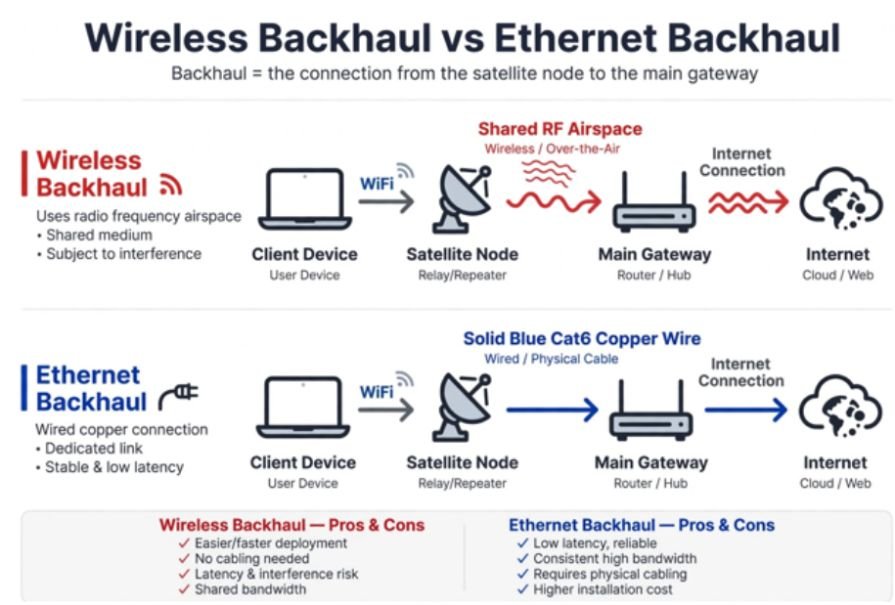
In a standard single-router setup, your phone talks directly to the gateway over radio waves. When you add mesh nodes to find wifi dead zones at home, those satellites act as relays.
A wireless backhaul handles this communication entirely over the air. The satellite receives a transmission from your phone, holds it in a buffer, and transmits it again across the room to the base station. That double-hop process introduces latency and consumes substantial airtime.
[ Wireless Backhaul ]
Client Device —(Wi-Fi)—> Satellite Node ~~~(Shared RF Airspace)~~~> Main Gateway —> Internet
[ Ethernet Backhaul ]
Client Device —(Wi-Fi)—> Satellite Node ====(Cat6 Copper Wire)====> Main Gateway —> Internet
The Wireless Half-Duplex Penalty
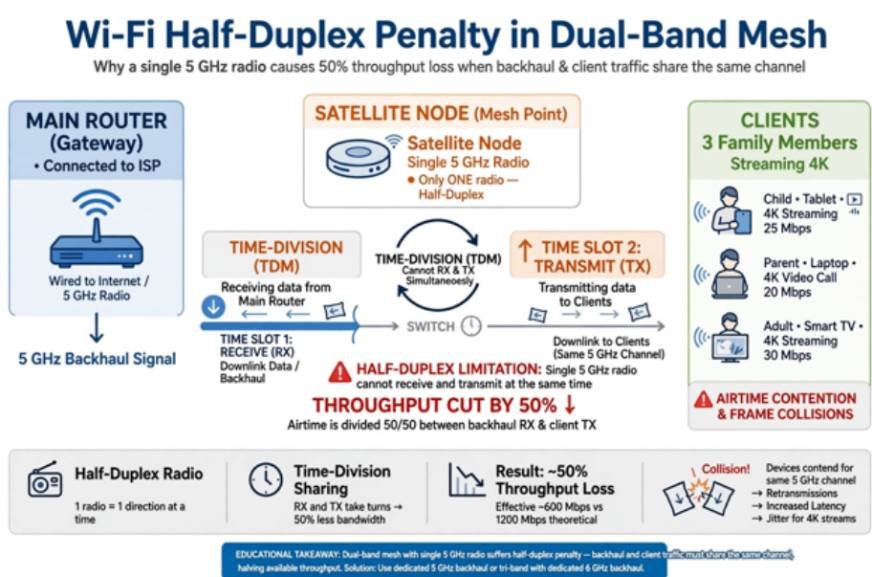
Wi-Fi operates as a half-duplex medium. A radio cannot transmit and receive on the same frequency at the exact same moment. In entry-level dual-band mesh systems, the 5 GHz radio handles both device connectivity and node-to-node relaying simultaneously.
This dynamic cuts your theoretical throughput by roughly 50% on the very first hop. Standards published by the IEEE Xplore digital library show that frame collisions and channel-clearing protocols compound this throughput loss exponentially as client density rises.
If three family members stream 4K video while you download a game patch, the satellites spend more time arbitrating radio access than delivering payload data.
The Dedicated Radio Band Workaround
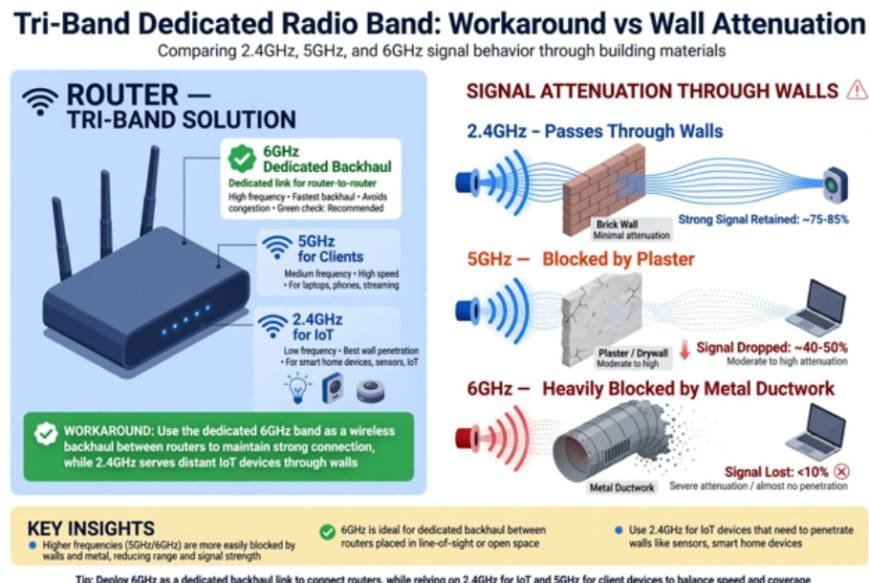
Tri-band and quad-band mesh systems attempt to mitigate this penalty by reserving an entire radio band—typically a secondary 5 GHz or 6 GHz frequency—exclusively for satellite-to-gateway traffic. The Wi-Fi Alliance standardized multi-link operation (MLO) to allow nodes to aggregate bands dynamically.
While this prevents the 50% retransmission penalty, it remains vulnerable to physical barriers. Radio frequency waves at 5 GHz and 6 GHz attenuate rapidly through dense materials like brick, plaster, subflooring, and metal ductwork. If the satellite receives a weak signal from the main router, the backhaul link speed drops, bottlenecking every device connected to that satellite regardless of device capability.
Why Ethernet Backhaul Outperforms Wireless Mesh
Ethernet backhaul replaces wireless node communication with dedicated twisted-pair copper cabling, such as Cat6 or Cat6a. Connecting a satellite via an Ethernet port offloads all inter-node communication from the airwaves onto physical copper.
Real-World Benchmarks: iPerf3 Throughput and Packet Jitter
To measure the real-world gap, I deployed an iPerf3 server on my local network and ran 10 parallel TCP/UDP streams between a client laptop and the gateway through a secondary node separated by two stud walls and an insulated floor.
| Metric | Dual-Band (Wireless) | Tri-Band (Dedicated 5 GHz Wireless) | Cat6 (Ethernet Backhaul) |
| Local TCP Throughput | 218 Mbps | 512 Mbps | 942 Mbps (Gigabit Port Limit) |
| Average Latency (Idle) | 14 ms | 6 ms | 0.8 ms |
| Loaded Latency (Jitter) | 84 ms (±32 ms) | 28 ms (±11 ms) | 1.9 ms (±0.4 ms) |
| Packet Loss (UDP Test) | 2.1% | 0.4% | 0.0% |
The throughput jump is noticeable, but the stability under load is the real upgrade. Bufferbloat and jitter disappear on a wired line. Online games stay responsive, and live audio streams avoid micro-stutters because packets do not queue behind competing radio traffic.
Eliminating Airtime Contention for Smart Devices
A wired backbone also solves common peripheral smart home bugs. If you often wonder why do smart devices keep disconnecting from wifi, the issue is frequently radio frequency exhaustion rather than bad hardware.
IoT gadgets like security cameras, smart plugs, and sensors communicate via 2.4 GHz bands. When wireless mesh nodes constantly broadcast management frames and backhaul payloads across overlapping airwaves, cheap IoT Wi-Fi chips drop their connection due to beacon timeouts. Moving node chatter to physical wire keeps the airwaves clean for lower-powered wireless endpoints.
Wired vs. Wireless Backhaul: Direct Specification Breakdown
The FCC enforces strict transmission power limits on unlicensed consumer Wi-Fi bands. Physical cables bypass RF power limits entirely, avoiding interference from neighborhood networks.
| Specification | Ethernet Backhaul | Wireless Backhaul |
| Physical Medium | Cat5e, Cat6, or Cat6a cabling | Unlicensed 2.4 GHz, 5 GHz, or 6 GHz RF bands |
| Bandwidth Retention | 100% up to interface link speed (1–10 Gbps) | 40% to 70% retention depending on node distance |
| Vulnerability to Walls | Zero impact | Severe attenuation through brick, plaster, and glass |
| Installation Effort | High (cable routing, wall plates, patch panels) | Low (plug-and-play pairing via mobile app) |
| Airtime Availability | 100% of Wi-Fi channels dedicated to clients | Bands split or shared between backhaul and devices |
| Multi-Hop Scalability | Linear throughput across any number of nodes | Speed cuts drastically with each daisy-chained node |
How to Deploy Ethernet Backhaul Without Rewiring Your House
Running Cat6 through finished drywall can be challenging. Fortunately, there are reliable ways to achieve wired backhaul performance without cutting open your walls.
The MoCA 2.5 Coaxial Alternative
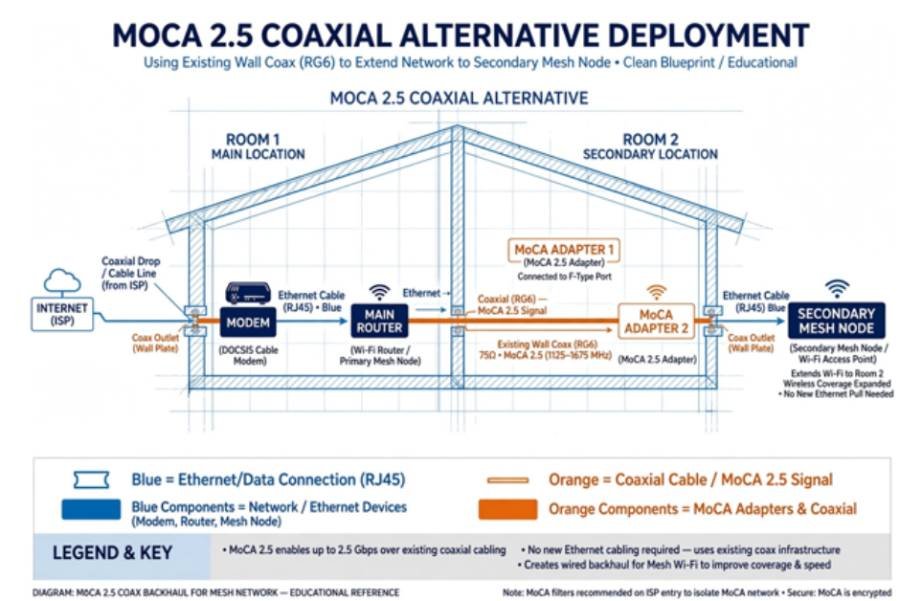
Most homes built in the last forty years already feature RG6 coaxial cables running to every room for cable television. MoCA (Multimedia over Coaxial Alliance) technology turns that existing dark coax into a high-speed Ethernet backbone.
A pair of MoCA 2.5 adapters delivers up to 2.5 Gbps of actual throughput with sub-2 ms latency, performing nearly identical to a newly installed Cat6 run. You plug an adapter into the coaxial port in the wall, run a short patch cable into your mesh node’s WAN/LAN port, and your backhaul is wired.
[ MoCA 2.5 Deployment ]
Modem —> Main Router —> MoCA Adapter 1 —> [ Existing Wall Coax ]
|
Secondary Node <— (Ethernet) <— MoCA Adapter 2 <—+
Network Switch Placement Rules
A common mistake with wired mesh networks is plugging satellite nodes into upstream modem ports. Consumer mesh systems require a specific topological order to prevent split routing tables and DHCP failures:
- Connect your modem directly to the primary mesh router’s WAN port.
- Run an Ethernet cable from the primary router’s LAN port to an unmanaged gigabit switch.
- Plug all satellite mesh nodes into that unmanaged switch.
Putting your satellites on the same local side of the primary router ensures seamless client roaming (802.11k/v/r) across nodes without dropping active sessions.
Frequently Asked Questions
1. Can I mix wired and wireless nodes in the same mesh network?
Yes, modern mesh systems support hybrid setups where high-demand rooms run on Ethernet while low-traffic areas use wireless nodes.
2. Does Ethernet backhaul improve Wi-Fi range?
Ethernet backhaul does not change radio range directly, but it allows you to place satellite nodes farther apart without suffering signal loss between them.
3. Do I need Cat6 or is Cat5e enough for a wired backhaul?
Cat5e supports gigabit speeds up to 100 meters, but Cat6 is recommended for new runs to support 2.5 Gbps and 10 Gbps backhaul links.
4. Will a powerline adapter work for Ethernet backhaul?
Powerline adapters work in simple environments, but electrical noise and split breaker phases often degrade speeds well below standard wireless backhaul.
My Final Verdict
Wireless mesh is undeniably convenient to set up in an afternoon, but it treats your local airspace like a shared party line. If you are paying for high-speed fiber or dealing with inconsistent ping during gaming sessions, physical cables remain the ultimate fix.
Test your home for unused coaxial outlets to try MoCA 2.5 adapters, or run clean surface-mount Cat6 along your baseboards. Hardwiring your access points frees up valuable radio spectrum, letting your Wi-Fi devices perform the way they were designed to.








